
Time to shut things down.... although I won't be posting here any further, I will keep the blog open for posterity (and information for all of you still needing Modbook info)
Seems all is not well with AXIOTRON but I wish them all the luck. They have been amazing people to deal with.
Adios Modbook Junction..................
Friday, March 4, 2011


Wednesday, April 7, 2010
Close but no cigar
Here's a drawing demo by caricaturist ANGIE JORDAN on Apple's new iPad using a POGO STYLUS and Autodesk's SKETCHBOOK PRO MOBILE.
As you can see, you can generate fairly articulate and decent sketches using the Pogo and SBP Mobile but as I predicted, it falls short of being a platform to do any kind of professional grade work. Coincidentally , you don't have to own and iPad to try this out as both the stylus and SBP Mobile work on an iPhone.
No Wacom digitizer pad & pen input. No Mac OS 10. No go. Case closed. However the iPad is still a great piece of technology to do everything else.
(Thanks to colleague Chris Battle for alerting me on this video)
UPDATE:
The POGO stylus is fairly inexpensive but in todays slow economy, every penny counts. Apparently our brothers and sisters from South Korea have come up with the ultimate in input devices. SAUSAGE LINKS. Yes you heard me. Weiners. Hotdogs. Whatever you wanna call them, if you ever get tired of using your fingers, just use some bratwurst instead! Now try creating your next masterpiece using a Farmer John Dodger dog and Sketchbook Pro Mobile....
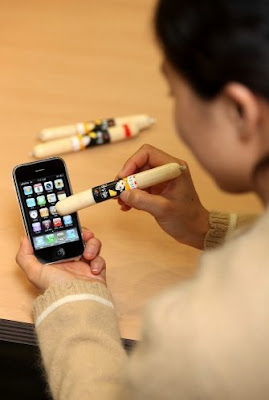
(Thanks again to the ever vigilant Chris Battle!)
As you can see, you can generate fairly articulate and decent sketches using the Pogo and SBP Mobile but as I predicted, it falls short of being a platform to do any kind of professional grade work. Coincidentally , you don't have to own and iPad to try this out as both the stylus and SBP Mobile work on an iPhone.
No Wacom digitizer pad & pen input. No Mac OS 10. No go. Case closed. However the iPad is still a great piece of technology to do everything else.
(Thanks to colleague Chris Battle for alerting me on this video)
UPDATE:
The POGO stylus is fairly inexpensive but in todays slow economy, every penny counts. Apparently our brothers and sisters from South Korea have come up with the ultimate in input devices. SAUSAGE LINKS. Yes you heard me. Weiners. Hotdogs. Whatever you wanna call them, if you ever get tired of using your fingers, just use some bratwurst instead! Now try creating your next masterpiece using a Farmer John Dodger dog and Sketchbook Pro Mobile....

(Thanks again to the ever vigilant Chris Battle!)
Wednesday, January 27, 2010
...but can you draw on it?
So it's the iPad.
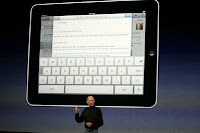
And it's exactly what I thought it was going to be. Basically this is what you'd get if an iPhone had a one night stand with a Kindle. At $500 it's affordable than what I thought so I may be getting one for the heck of it.
So now comes the interesting spectator sport that is; watching third party companies develop stuff for this new device. Personally I want to see what they come up with as far as drawing is concerned. A drawback could be the screen. Pressure sensitivity and stylus compatibility are two major challenges which could be offset by the quality of the simulation. If it's the same as the iPhone screen wise then they have an uphill climb.
As bulky and even low-tech as the Modbook is, (compared to the iPad of course) I know it was designed with a pen input and I can depend on it for art. As eagerly anticipated as the iPad was, it's not as big as my anticipation for the Moodbook Pro which will be the ultimate in portable workstations.
***ADDENDUM***
If you already own an iPhone, one great feature on the iPad is that you'll be able to run all your iPhone apps. This means drawing apps like iPaint or Sketchbook Mobile will enable you to use the screen to draw with either your digits or an input device such as the Pogo. That's great if you're Picasso or Van Gogh but when it comes to precise input control for drawing, it simply won't cut it.
It's pretty clear: The iPad is a mass consumer product much like any of Apple's products. As much as Apple computers dominate the graphic arts world, it is a very small percentage of Apple's market. That is the reason why companies like Axiotron are necessary in satisfying that small but niche market.

And it's exactly what I thought it was going to be. Basically this is what you'd get if an iPhone had a one night stand with a Kindle. At $500 it's affordable than what I thought so I may be getting one for the heck of it.
So now comes the interesting spectator sport that is; watching third party companies develop stuff for this new device. Personally I want to see what they come up with as far as drawing is concerned. A drawback could be the screen. Pressure sensitivity and stylus compatibility are two major challenges which could be offset by the quality of the simulation. If it's the same as the iPhone screen wise then they have an uphill climb.
As bulky and even low-tech as the Modbook is, (compared to the iPad of course) I know it was designed with a pen input and I can depend on it for art. As eagerly anticipated as the iPad was, it's not as big as my anticipation for the Moodbook Pro which will be the ultimate in portable workstations.
***ADDENDUM***
If you already own an iPhone, one great feature on the iPad is that you'll be able to run all your iPhone apps. This means drawing apps like iPaint or Sketchbook Mobile will enable you to use the screen to draw with either your digits or an input device such as the Pogo. That's great if you're Picasso or Van Gogh but when it comes to precise input control for drawing, it simply won't cut it.
It's pretty clear: The iPad is a mass consumer product much like any of Apple's products. As much as Apple computers dominate the graphic arts world, it is a very small percentage of Apple's market. That is the reason why companies like Axiotron are necessary in satisfying that small but niche market.
Tuesday, January 26, 2010
My Moodbook's a Toddler!
...well almost. My Modbook is two years old. It's showing a lot of wear and tear but the darn thing is an iron horse. It just keeps chugging along.
Reliability? Check. Durability? Check. Floats in water? I hope I never find out. Happy birthday dude.
Monday, January 18, 2010
Moodbooks are so easy....

...even a kid can use them. My daughter sketching a masterpiece via Autodesk Sketchbook Pro 2009 over the holiday break.
Monday, January 4, 2010
iTablet? iSlate? idunno...
 So what's up with this impending release from Apple? Speculations run from it being a netbook with iPhone capabilities to a whole new breed of portable with it's own OS?
Honestly I think it will be a Kindle / Sony Reader killer with Wi-Fi, GPS and talk capability. What I'm most interested is how they will handle a keyboard and navigation. From what I've read the screen size is anywhere from a 6 inch to a 10 inch. Way too small to draw on if you decide to use it for sketching and/or graphics work. (at least for me)
And then again, can you even draw on it? Will it be Wacom based and compatible with their pens? Personally I don't see a need for such a device. But that was what we said about a little box called the iPod. Of course we all know how that turned out.
Saturday, January 2, 2010
I-heart-Sketch
This program looks promising. Who wouldn't want to do some 3D doodling? I'll see about getting it and report back here....
Monday, October 12, 2009
Axiotron Studio Pen
I've been waiting for this product since I got my Modbook in 2008. Now my wait is over.


The stock stylus that comes with the Modbook certainly does the job. But anyone who's drawn using any of the Wacom Cintiq styluses knows how much more ergonomic and comfortable they are. Unfortunately the aforementioned styluses don't work on the Modbook due to a system incompatibility.
Thankfully the good people of Axiotron have followed through on their promise of offering more precise and better performing tools to support the Modbook.
Today I got my STUDIO PEN in the mail and tonight I got the chance to finally try it out. From the get go it is marvelous tool. If fits perfectly on your hand and feels exactly like the Wacom Cintiq stylus. The kit comes with extra pen nibs ( including those sought after graphite nibs), extra clicker and rubber grip. So one can really feel good about putting the pen through some constant, real world use.
Compared to the stock stylus, the Studio Pen is more sensitive and gives really subtle feedback. The graphite nib responds smoothly to the digitizer and sleek, ergonomic grip feels natural and intuitive. The only drawback is that the pen won't fit the cleverly designed pen garage on the bottom of the Modbook. But this is a small price to pay. The upgrade in quality is worth the price and I tend to carry accessories in my gig bag anyway.
So if you are an owner of a Modbook, it would behoove you to give the Studio Pen a try.


Friday, May 1, 2009
PREVIEW: Autodesk Sketchbook Pro 2010
You've read my gripes about the lack of a considerable upgrade to SKETCHBOOK PRO, despite the 2009 version.
Well apparently Autodesk has made some considerable upgrades to SBP and from what i've seen, it's something probably worth getting excited about.
Chris Cheung, the SBP product manager for Autodesk has released a full-fledged preview of SKETCHBOOK PRO 2010 HERE. Some of the new tools i'm looking forward to are the elliptical tool which enables you to do precise line work using shapes, and the new texture feature in the do-it-yourself brush tool which now has the ability for the user to create custom brushes. There's also the elliptical ruler which enables you to do draw straight edged lines.
They've also added blur and sharpen tools which will come in very handy. The site has preview videos for each of the new features although, the lack of audio commentary is kind of a let down. (the tools do speak for themselves though...)
As soon as I get my hands on a copy and put it through it's paces, i'll post my review right here.
Friday, January 30, 2009
Happy Birthday

It's been a year since I received my Modbook in the mail and I don't think I have to elaborate on how this little machine has affected my work and my life.
So I just want to simply commemorate things by saying happy birthday. You're one year older and sadly, a few steps towards obsolescence.
Thank you to everyone who's emailed me inquiring about the Modbook and those who have frequented this blog, which also is celebrating it's one year anniversary.
The Modbook journey continues....
Wednesday, January 7, 2009
Modbook Mania at Macworld 2009

In between doing on-site demos of storyboards and sketches I was able to also attend the official unveiling of Axiotron's new crown jewel, the MODBOOK PRO which is now available for pre-order at the their website. (The first units ship this coming June)
The Modbook Pro is one stunning machine. This time the mod involves taking the basic guts of a Macbook Pro and encasing it into a multi-bodied aluminum shell exclusively designed and built by Axiotron. Of course it's Wacom Pen-abled and features a new button-less digitizer and frame which has optional matte or glossy surfacing, depending on the user preference. It's an exotic design really. It makes my Modbook look pedestrian in comparison. But be prepared to shell out a few bucks. A modestly equipped Modbook Pro will cost you around $5,000. For the portability, I think it's worth the money. Personally I don't think i'll be getting near a sniff of one for a long time....
To complement the added power of the Modbook Pro, Axiotron also announced it's new breakthrough touch technology called SYNERGY which finally brings touch sensitivity to the Modbook and will enable users to pull up a set of programmable keys that will be used in conjuction with the Pen. In other words, one can now use the Modbook without a keyboard to work in Photoshop, Illustrator and other design software. Keys like the Command, Alt and Control keys are included in the basic set up.
According to Axiotron founder and lead engineer Andreas Haas. The key was to design Synergy independent of the Wacom Pen, thereby eliminating any chance of both technologies from conflicting with each other. Synergy will be available in April as a free download to existing Modbook users and will be available to non-Modbook users for a fee.
Apple co-founder and Axiotron consultant Steve Wozniak was on-hand to at the unveiling and also performed a demo of the new QuickScript handwriting recognition software which he is helping develop in conjunction with Axiotron. QuickScript is designed not only to recognize a specific user's handwriting but it's advanced AI enables it to learn unique and subtle quirks in ones handwriting, thereby customizing itself for that user. It's also programmed to recognize different languages so one can write in Chinese, French, Japanese as well as basic English. (It's so smart, we're told it can distinguish between native French from Canadian French)
As for the convention itself? It's a virtual candy store if your a Mac fanatic. (or an iPhone fiend to be even more specific) Every third-party product from cases, peripherals, software and services is on hand. I didn't really need one but I scored a new iPhone case just for the heck of it. One of my favorites was the Google booth which showcased their iPhone GPS mapping and Google Earth apps, as well as a nice iPhone charging island where the power challenged could tank up on free juice.
All in all I had a swell time at the Mac geek ball. My sincere thanks to everyone at Axiotron for making me a part of their Macworld presentation. Check out the pictures below.

The Axiotron Pavillion

Here's the Modbook Pro encased in protective glass, away from my envious hands...

..and it's keeps it's really slim profile...

That's Steven "Woz" Wozniak and Axiotron president and engineer Andreas Haas at the unveiling of the Modbook Pro

Andreas talks up the Modbook Pro. According to him the three most common user requests after the release of the original Modbook are: More buttons. More Power and a longer battery. Mission accomplished on the Modbook Pro

A view of Moscone Center South and Mac geek ville.....

... and where would we all be without the almighty Apple?....

The demo line up today included yours truly as well as the super talented comic book artist Kody Chamberlain who conducted a concerto on his Photoshop demos...

Macworld wouldn't be complete without Googly - Google....
 One final snapshot of yours truly at the end of one of my demos
.... ciao from San Francisco. Maybe I get to go again next year?
Thursday, December 25, 2008
Press Release: Axiotron at Macworld 2009

El Segundo, California based Axiotron Incorporated, makers of the award winning Modbook has just posted a press release regarding the upcoming MACWORLD CONFERENCE in San Francisco, California. The Modbook is being re-introduced with new enhancements in functionality and drawing capability as well as new hardware improvements, especially with Bluetooth technology.
The official press release is HERE. I'll be there on Wednesday, January 7th to do presentations on illustration and storyboarding and how the Modbook impacts my workflow. Hope to see you there.
Tuesday, November 11, 2008
Macworld Conference 2009
I've been invited by AXIOTRON to do on-site Modbook demos at their booth during the annual MACWORLD CONFERENCE in San Francisco. The conference and expo features the state of the art in the world of Apple and it's computers and devices. For a Mac user, this is equivalent to going to Comic-Con where you can get a first look on the latest products.
The conference runs January 5th to 9th, 2009 at the Moscone Center in downtown San Francisco. I'll be there on Wednesday, January 7th for the whole day at the Axiotron Booth. Check back here for a full report and pictures.
If you're attending and want to say hello, Axiotron is at booth 502.
Click HERE for more info on Macworld Conference.
Wednesday, October 8, 2008
Recent Sketches

It's been a while since I posted here so I thought I'd put up some recent drawings. These where done on Adobe Photoshop using a modified grease pencil at 80 percent opacity and 100 percent flow. Shape dynamics are set to pen pressure at a minimum diameter of 1 pixel. All other presets are turned off except for noise and other dynamics.

Tuesday, August 5, 2008
Comic-Con 2008 Modbook Recap

Another Comic-Con has come and gone and for this year's convention, I had the pleasure of having my Axiotron Modbook with me.
The common questions asked of visitors at my table where "What's that?" and "That's a Macintosh?" "How different is it from a Wacom Cintiq?" Many have already heard of the Modbook which means the word of mouth has gone around. But an equal amount of people where completely surprised by it. They had no idea such a device existed.
Obviously many where eager to try out the Modbook for themselves and I was more than happy to oblige them. For all of you thinking about getting one and are on the fence, drawing on it is the only real way to know. Of course you already know where I come out on that.
I'm awaiting word on when and where Axiotron will be doing the next demo. (Hopefully somewhere at SIGGRAPH 2008 in Los Angeles this month) Otherwise, feel free to flag me down if you see me walking down the street.....
More pictures from San Diego are HERE on my Comic-Con recap on Random Anomalies.
Monday, July 21, 2008
Modbook at San Diego Comic-Con '08

If you are in the Southern California area and would like to see the Modbook in action, I'll be doing some sketching using my Modbook during this week's San Diego Comic-Con. Go to Exhibitor Table G4 to check it out. I can also fill you in on the making of my new sketchbook ALTERNATING CURRENTS.
Product brochures will also be available at my table courtesy of the fine folks at Axiotron. Hope to see you there...
Friday, June 20, 2008
The Modbook Payoff

One of my main reasons for upgrading to a digital workstation is streamlining my process, both with my story art and self-publishing endeavors.
With my latest sketchbook ALTERNATING CURRENTS, the Modbook enabled me to illustrate and assemble the project in half the time. Though the book features traditional drawings, it is predominantly digital which reduced the amount of scanning resulting in decreased production time.
Of course there is the contention that the book looks too digital and less traditional. This is simply one way of doing things and if one puts in the time, those digital creations are on par with their traditional counterparts.
In the end, programs like Photoshop, Painter and Sketchbook Pro are merely tools just like Oils, pastels and watercolors. The intangible will always be the artist.
Tuesday, May 6, 2008
Accessory Update: iRizer & Folding Keyboard

It took a while but I finally received two products I purchased in February from MATIAS: The iRizer notebook stand and the Folding USB Keyboard.
The iRizer has been available for a while now but the Macintosh version of the folding keyboard was delayed and they didn't want to ship the items separately. The iRizer was exactly what I thought it was going to be. A portable, lightweight stand for everyday use. I had reservations because the maximum tilt angle was only 50 degrees which may not be enough to view the screen directly. But I am happy to report that at normal table height, I had no problem viewing the screen at all. (This stand is intended to hold a normal laptop so the maximum 50 degree angle would be at the extreme) The iRizer is made out of hard plastic and easy to carry and assemble. And since it disassembles flat, it's pretty easy to slip in a laptop case.
I wasn't sure what I would be getting with the Matias Folding Keyboard. All the product photos looked very good but like anything you buy over the internet, it's a roll of the dice in terms of actual quality. Once again I am happy to report that THIS KEYBOARD IS PRETTY AWESOME! The great thing about it is that you're not sacrificing functionality at all. It is a full sized keyboard. What you gain in space and weight in a mini-keyboard, you give up in functionality but that is not the case with this product.
Like the iRizer, it's lightweight. As a matter of fact it weighs next to nothing. Yet when you open it up, lay it down and start typing on it, it feels just like a regular keyboard. It has just the right amount of tactile feedback and the keyboard action is smooth and fluid. The construction quality is impressive as well. Extra functions include dedicated buttons for controlling the system volume. (Mute, Volume up and down)
One gripe I have is that they took out the Caps Lock key in lieu of a Fn key. They incorporated this button so certain functions could be used without having to move your hand to reach across the keyboard. So to enable the Caps Lock you have to press Fn then another key. A little irritating when you are in a groove typing.
One question left to answer for both products is durability, especially for the keyboard. I plan to use the keyboard full time either on the go or at home. So we'll see how it fares in the long run. Info including product measurements and such can be found on the sidebar in the accessory links.
 Now I've got a portable iMac!
 Folding keyboard...Transform!!
 ..Fzzzzzzt!!
 Thankfully, assembly of the iRizer requires zero brain power. Just slide the stand in the desired slot/viewing angle and .....
 ...voila!!
 This is at the 50 degree setting
 ... now that it's done, simply add a Modbook
Even though this angle is tolerable for general use, I suppose ergonomically, it will cause fatigue at some point. I've tried propping up a book at the back end of the stand to increase the angle and it certainly makes it better, however I shouldn't have to explain that this might cause the whole thing to come crashing forward so use your best judgement. Use a Reader's Digest instead of War and Peace.

 ....zzzzzzzzzz
iRizer Update - 5-6-08
As much as the iRizer works great as an all around stand, it's a little rickety to do a lot of drawing on especially if you have a heavy stroke. If you plan on using your Modbook as your main workstation, the iRizer is probably not for you. A more sturdy stand or monitor arm will work better.
As much as the iRizer works great as an all around stand, it's a little rickety to do a lot of drawing on especially if you have a heavy stroke. If you plan on using your Modbook as your main workstation, the iRizer is probably not for you. A more sturdy stand or monitor arm will work better.
Monday, April 28, 2008
SKETCHBOOK PRO 2009: Inching Forward
I was astounded when I first demo'd Alias' Sketchbook Pro in 2005 at SIGGRAPH on a Wacom Cintiq. This was the future I thought. A true digital drawing platform that delivered realistic tool simulation the likes of which have never been seen. I downloaded a demo and I was hooked. Soon I purchased version 2.0 and over two years, one comic book and numerous sketches and illustrations later, SBP is still a mainstay in my digital process.
In between that time, Alias was acquired by Autodesk and this beloved program was put in limbo with it's future uncertain. Rumors of other companies purchasing SBP where rampant and speculation was that Autodesk was simply going to let the program die. Meanwhile the SBP faithful clamored for so many features to be added to SBP in a hypotethical version 3.0.
The ability to work on multiple windows, blend modes, fill or paintbucket feature, special effects, etc. are just some of the many suggested new features that can make an already great product more powerful.
After downloading and performing trials on Autodesk's attempt at an updated version of SBP, I can safely say that it's been sort of a let down. I guess I was really looking forward to a much more substantial upgrade that what was released.
Basically, the program remains unchanged. ( see Fig 1 and 2 below for the interface comparison) This is a GOOD thing really because had they fooled around with the tool simulation I would have really cried foul, got my cash back and ran back to the loving arms of version 2.0. But thank goodness Autodesk decided not to fix something that wasn't broken.
Okay so what's new? Not a whole lot really. The following are the two most notable new features:
1. PHOTOSHOP PSD INTEGRATION - It's now possible to switch from Photoshop to SBP seamlessly and modify PSD files. SBP even preserves all the original layer information. This is a very big deal because the old alternative was to work with TIFF files. Because SBP's compression is different from Photoshop, layers where automatically flattened when you create TIFF files in SBP and import them to Photoshop. (and vice versa)
2. FLOOD FILL / FLOOD FILL VISIBLE LAYERS - a.k.a - a paintbucket tool. No more enlarging the paintbrush to fill large portions of art with color. Unfortunately these new tools won't work in conjunction with either Select or Lasso Select. Pretty lame in my estimation. So the way it works is the area to be filled must be closed in by a line.
The less notable features? In the LAYER window a thumbnail of each layer is now visible.Instead of writing in the name of a layer, it's now typed in via keyboard. (You can still write the layer name in by selecting this view) And to accomodate the layer thumbnail image, the layer opacity slider has been moved. Honestly these features are either here or there for me. In fact, the old layer interface in SBP 2.o was better. This one looks pretty clunky.
So if I had to grade Autodesk on this version of SBP what would it be? a whopping C+
As much as I am glad that SBP is getting a much needed boost, it falls short of expectations and the new features (mainly the FILL tools) lack any kind of groundbreaking functionality. This felt like "going through the motions" and does not take advantage of the programs unique and innate qualities.
Thankfully for us who have come to rely on Sketchbook Pro, the program still delivers the goods and the additional features are a welcome addition. I hope there's a bit more vision and a whole lot more useful features to be found in the next version of this landmark program.
 Fig. 1 - The old Alias SBP version 2.o interface
 Fig. 2 - The new SBP 2009 interface. Not much has changed.
-- 0 --
In between that time, Alias was acquired by Autodesk and this beloved program was put in limbo with it's future uncertain. Rumors of other companies purchasing SBP where rampant and speculation was that Autodesk was simply going to let the program die. Meanwhile the SBP faithful clamored for so many features to be added to SBP in a hypotethical version 3.0.
The ability to work on multiple windows, blend modes, fill or paintbucket feature, special effects, etc. are just some of the many suggested new features that can make an already great product more powerful.
After downloading and performing trials on Autodesk's attempt at an updated version of SBP, I can safely say that it's been sort of a let down. I guess I was really looking forward to a much more substantial upgrade that what was released.
Basically, the program remains unchanged. ( see Fig 1 and 2 below for the interface comparison) This is a GOOD thing really because had they fooled around with the tool simulation I would have really cried foul, got my cash back and ran back to the loving arms of version 2.0. But thank goodness Autodesk decided not to fix something that wasn't broken.
Okay so what's new? Not a whole lot really. The following are the two most notable new features:
1. PHOTOSHOP PSD INTEGRATION - It's now possible to switch from Photoshop to SBP seamlessly and modify PSD files. SBP even preserves all the original layer information. This is a very big deal because the old alternative was to work with TIFF files. Because SBP's compression is different from Photoshop, layers where automatically flattened when you create TIFF files in SBP and import them to Photoshop. (and vice versa)
2. FLOOD FILL / FLOOD FILL VISIBLE LAYERS - a.k.a - a paintbucket tool. No more enlarging the paintbrush to fill large portions of art with color. Unfortunately these new tools won't work in conjunction with either Select or Lasso Select. Pretty lame in my estimation. So the way it works is the area to be filled must be closed in by a line.
The less notable features? In the LAYER window a thumbnail of each layer is now visible.
So if I had to grade Autodesk on this version of SBP what would it be? a whopping C+
As much as I am glad that SBP is getting a much needed boost, it falls short of expectations and the new features (mainly the FILL tools) lack any kind of groundbreaking functionality. This felt like "going through the motions" and does not take advantage of the programs unique and innate qualities.
Thankfully for us who have come to rely on Sketchbook Pro, the program still delivers the goods and the additional features are a welcome addition. I hope there's a bit more vision and a whole lot more useful features to be found in the next version of this landmark program.
 Fig. 1 - The old Alias SBP version 2.o interface
 Fig. 2 - The new SBP 2009 interface. Not much has changed.
-- 0 --
Saturday, April 26, 2008
Autodesk Sketchbook Pro 2009
It's been a long time coming but the much clamored-for update for the phenomenal digital sketch program SKETCHBOOK PRO is finally available for purchase.
I paid $90 for the downloadable upgrade from Alias' version 2.0. Now called SKETCHBOOK PRO 2009, it has some new features including the ability to import and modify Photoshop PSD files. Expect a full review soon on a separate post.
I paid $90 for the downloadable upgrade from Alias' version 2.0. Now called SKETCHBOOK PRO 2009, it has some new features including the ability to import and modify Photoshop PSD files. Expect a full review soon on a separate post.
Subscribe to:
Posts (Atom)


