
Time to shut things down.... although I won't be posting here any further, I will keep the blog open for posterity (and information for all of you still needing Modbook info)
Seems all is not well with AXIOTRON but I wish them all the luck. They have been amazing people to deal with.
Adios Modbook Junction..................
Friday, March 4, 2011


Wednesday, April 7, 2010
Close but no cigar
Here's a drawing demo by caricaturist ANGIE JORDAN on Apple's new iPad using a POGO STYLUS and Autodesk's SKETCHBOOK PRO MOBILE.
As you can see, you can generate fairly articulate and decent sketches using the Pogo and SBP Mobile but as I predicted, it falls short of being a platform to do any kind of professional grade work. Coincidentally , you don't have to own and iPad to try this out as both the stylus and SBP Mobile work on an iPhone.
No Wacom digitizer pad & pen input. No Mac OS 10. No go. Case closed. However the iPad is still a great piece of technology to do everything else.
(Thanks to colleague Chris Battle for alerting me on this video)
UPDATE:
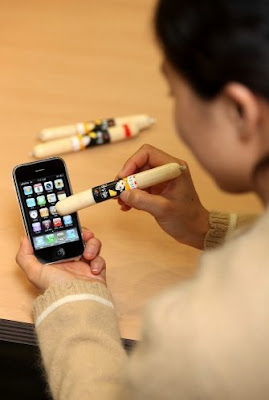
The POGO stylus is fairly inexpensive but in todays slow economy, every penny counts. Apparently our brothers and sisters from South Korea have come up with the ultimate in input devices. SAUSAGE LINKS. Yes you heard me. Weiners. Hotdogs. Whatever you wanna call them, if you ever get tired of using your fingers, just use some bratwurst instead! Now try creating your next masterpiece using a Farmer John Dodger dog and Sketchbook Pro Mobile....
(Thanks again to the ever vigilant Chris Battle!)
As you can see, you can generate fairly articulate and decent sketches using the Pogo and SBP Mobile but as I predicted, it falls short of being a platform to do any kind of professional grade work. Coincidentally , you don't have to own and iPad to try this out as both the stylus and SBP Mobile work on an iPhone.
No Wacom digitizer pad & pen input. No Mac OS 10. No go. Case closed. However the iPad is still a great piece of technology to do everything else.
(Thanks to colleague Chris Battle for alerting me on this video)
UPDATE:
The POGO stylus is fairly inexpensive but in todays slow economy, every penny counts. Apparently our brothers and sisters from South Korea have come up with the ultimate in input devices. SAUSAGE LINKS. Yes you heard me. Weiners. Hotdogs. Whatever you wanna call them, if you ever get tired of using your fingers, just use some bratwurst instead! Now try creating your next masterpiece using a Farmer John Dodger dog and Sketchbook Pro Mobile....

(Thanks again to the ever vigilant Chris Battle!)
Wednesday, January 27, 2010
...but can you draw on it?
So it's the iPad.
And it's exactly what I thought it was going to be. Basically this is what you'd get if an iPhone had a one night stand with a Kindle. At $500 it's affordable than what I thought so I may be getting one for the heck of it.
So now comes the interesting spectator sport that is; watching third party companies develop stuff for this new device. Personally I want to see what they come up with as far as drawing is concerned. A drawback could be the screen. Pressure sensitivity and stylus compatibility are two major challenges which could be offset by the quality of the simulation. If it's the same as the iPhone screen wise then they have an uphill climb.
As bulky and even low-tech as the Modbook is, (compared to the iPad of course) I know it was designed with a pen input and I can depend on it for art. As eagerly anticipated as the iPad was, it's not as big as my anticipation for the Moodbook Pro which will be the ultimate in portable workstations.
***ADDENDUM***
If you already own an iPhone, one great feature on the iPad is that you'll be able to run all your iPhone apps. This means drawing apps like iPaint or Sketchbook Mobile will enable you to use the screen to draw with either your digits or an input device such as the Pogo. That's great if you're Picasso or Van Gogh but when it comes to precise input control for drawing, it simply won't cut it.
It's pretty clear: The iPad is a mass consumer product much like any of Apple's products. As much as Apple computers dominate the graphic arts world, it is a very small percentage of Apple's market. That is the reason why companies like Axiotron are necessary in satisfying that small but niche market.

And it's exactly what I thought it was going to be. Basically this is what you'd get if an iPhone had a one night stand with a Kindle. At $500 it's affordable than what I thought so I may be getting one for the heck of it.
So now comes the interesting spectator sport that is; watching third party companies develop stuff for this new device. Personally I want to see what they come up with as far as drawing is concerned. A drawback could be the screen. Pressure sensitivity and stylus compatibility are two major challenges which could be offset by the quality of the simulation. If it's the same as the iPhone screen wise then they have an uphill climb.
As bulky and even low-tech as the Modbook is, (compared to the iPad of course) I know it was designed with a pen input and I can depend on it for art. As eagerly anticipated as the iPad was, it's not as big as my anticipation for the Moodbook Pro which will be the ultimate in portable workstations.
***ADDENDUM***
If you already own an iPhone, one great feature on the iPad is that you'll be able to run all your iPhone apps. This means drawing apps like iPaint or Sketchbook Mobile will enable you to use the screen to draw with either your digits or an input device such as the Pogo. That's great if you're Picasso or Van Gogh but when it comes to precise input control for drawing, it simply won't cut it.
It's pretty clear: The iPad is a mass consumer product much like any of Apple's products. As much as Apple computers dominate the graphic arts world, it is a very small percentage of Apple's market. That is the reason why companies like Axiotron are necessary in satisfying that small but niche market.
Tuesday, January 26, 2010
My Moodbook's a Toddler!
...well almost. My Modbook is two years old. It's showing a lot of wear and tear but the darn thing is an iron horse. It just keeps chugging along.
Reliability? Check. Durability? Check. Floats in water? I hope I never find out. Happy birthday dude.
Monday, January 18, 2010
Moodbooks are so easy....

...even a kid can use them. My daughter sketching a masterpiece via Autodesk Sketchbook Pro 2009 over the holiday break.
Monday, January 4, 2010
iTablet? iSlate? idunno...
 So what's up with this impending release from Apple? Speculations run from it being a netbook with iPhone capabilities to a whole new breed of portable with it's own OS?
Honestly I think it will be a Kindle / Sony Reader killer with Wi-Fi, GPS and talk capability. What I'm most interested is how they will handle a keyboard and navigation. From what I've read the screen size is anywhere from a 6 inch to a 10 inch. Way too small to draw on if you decide to use it for sketching and/or graphics work. (at least for me)
And then again, can you even draw on it? Will it be Wacom based and compatible with their pens? Personally I don't see a need for such a device. But that was what we said about a little box called the iPod. Of course we all know how that turned out.
Saturday, January 2, 2010
I-heart-Sketch
This program looks promising. Who wouldn't want to do some 3D doodling? I'll see about getting it and report back here....
Subscribe to:
Posts (Atom)


